

I help sites rank on Google and get cited by ChatGPT. Rank Season: the workflows that rank, sent every Monday. What moved, what works, what pays. Free ↓
Joined August 2026
- Tweets8K
- Following3.8K
- Followers2.1K
- Likes4.1K


Pinned Tweet
most SEO news is noise. a few things actually move rankings and revenue each week
Rank Season sends just those every Monday: what moved in Google and AI search, the AI workflows that rank, and the plays that turn clicks into money
free. first issue drops soon, get on the list: rankseason.com

Google now shows the full AI Overview by default on definition searches. no "Show more" click needed.
Glenn Gabe spotted it today and Barry Schwartz covered it. on a "define" search, the AI answer fills the whole first screen.
if you run a glossary, expect fewer clicks from "what is X" searches.
that doesn't make those pages useless. glossary pages were never mostly a click play. writers link to the page that backs up a term they used. it's one of the easiest ways to earn links.
the glossary value check:
1. in Search Console, filter queries with "what is", "meaning" or "define"
2. compare clicks and CTR from the week before Nov 11 with the week after
3. the core update is rolling out too, so check if your other pages moved the same way
4. in your link tool, see which glossary pages have referring domains
5. pages with links: keep them and link them to pages that make money
6. pages with no clicks and no links: fold them into the main topic page
is your glossary earning links or just traffic?
1
4
204
moving your site behind a CDN? Googlebot can start crawling harder the day you switch, and your origin server still takes the hit.
Google covered this today (Gary Illyes and Cherry Prommawin, Search Central blog and Non-Canonical Cabinet episode 5):
- Google's crawlers raise the crawl rate when a server answers fast and stable. a CDN edge looks like a big hardware upgrade
- a new CDN starts with a cold cache. the first request for every URL is a cache miss that goes straight to your origin
- people visit a few popular pages. crawlers walk your whole URL inventory, so they cause most of the misses
- the panic move is blanket bot protection. Googlebot can't pass a CAPTCHA, crawlers back off, and pages start dropping out of Search
the CDN launch check:
1. allow verified bots in your CDN or WAF before any bot rules go live
2. pre-warm the cache: fetch your top traffic pages, upcoming promo pages and most crawled URLs through the CDN at a controlled pace
3. if the origin still struggles, return 429 or 503 for a few hours, 1 to 2 days at most. not a 403 wall, not a challenge page
4. after launch, run URL Inspection on a few key URLs. if the rendered page shows a bot challenge or an error, fix the rule
5. watch server logs and the Crawl Stats report for the first week
if you're moving infra before Black Friday, note Google's own example of what to pre-warm: promotional and seasonal launch pages.
limits: Google gives no number for how fast the crawl rate ramps, and says many CDNs pace connections, so your spike may be small.
which CDN are you on, and are verified bots allowed right now?
1
3
188
John Mueller said it again this week: a big pile of "Crawled/Discovered - currently not indexed" in Search Console usually means Google's quality systems aren't convinced about your site.
the part people skip: he added that just making the site smaller doesn't significantly raise its overall quality. so mass noindexing or redirecting the stuck URLs isn't a fix on its own.
and if only a tiny share of your pages is indexed, it's either a severe technical issue you'd clearly notice, or Google isn't convinced about the site overall.
the not-indexed quality check:
1. rule out the technical side first: server errors, blocked resources, a crawl stats drop
2. export the stuck URLs from the Pages report and group them by template (tag, location, product, blog)
3. put each group next to your indexed pages. what does the indexed version have that the stuck one doesn't?
4. if a whole template is stuck, rebuild that template instead of hiding it
5. recheck the same groups in a few weeks
how much of your site is sitting in not indexed right now?
4
4
188
Google's own docs say an indexed page that starts returning a 4xx gets removed from the index. Gary Illyes just described an exception.
VLC's website served a 418, the joke "I'm a teapot" code. Google treats that like most 4xx errors: not found.
the page didn't drop out. per Gary, Search "temporarily protected the URL from falling out of the index right away" because it's such an important page.
the side effect is the useful part. Google no longer knew what was on the page, so the listing kept only the link and the last good title. no snippet, no favicon.
so if a key page shows up in Google bare like that, call it the bare listing check:
1. check the status code before you touch the content
2. run a live test in URL Inspection, and check headers from outside your own network too. a CDN or firewall rule can answer Googlebot differently than it answers your browser
3. get it back to 200 with the real content, then wait. VLC is back on 200 and Gary said it should sort itself out soon
limits: this is one Googler explaining one very well known site. Google hasn't said which URLs get this protection or for how long, so don't plan around it. for most sites, assume the documented rule: 4xx means removed.
h/t Barry Schwartz at Search Engine Roundtable
Rank Season is the free monday SEO newsletter for checks like this. first issue drops soon, and subscribers get exclusive access to a link trading community. link in bio
have you ever seen one of your pages in Google with no snippet at all?
1
2
95
Rank Season, the free monday SEO newsletter. first issue soon, and subscribers get the link trading community: rankseason.com/?ref=x-post

1
14
Google confirmed the November 2026 core update today. the rollout can take up to 2 weeks.
the worst move right now is rewriting pages because rankings bounce on day 2.
Google's own core update page says: wait until the rollout is done, wait at least one more full week, then compare that week with a week before the update started.
one catch: Barry Schwartz saw big swings earlier this week, before the announcement. so pick a clean baseline like Oct 31 to Nov 6.
the core update date check:
1. note the start date (Nov 10) in your reports
2. leave pages that were already working alone
3. when the Search Status Dashboard shows it complete, wait 7 days
4. in Search Console, compare that week vs your baseline week, by page and by query
5. small drops (like 2 to 4): leave them. big drops (like 4 to 29): review the whole site, not one page
I'll cover what moved in Rank Season once it settles.
are you seeing movement yet?
3
4
265
your "site by" credit in the footer of every client site is not a link strategy. Google's spam policy names it.
from Google's link spam list, the items that hit agencies, SaaS and theme sellers:
- widely distributed links in the footers or templates of various sites
- keyword-rich, hidden or low-quality links inside widgets that get embedded across sites
- requiring a link in your terms of service or a contract without letting the site owner qualify it
- partner pages that exist only to cross-link
the same page says paid and sponsorship links are fine when they carry rel="sponsored" or rel="nofollow".
the footer and widget link check:
1. in your link tool, filter referring pages by your credit, badge or embed anchor text
2. sort them: footer or template, widget or embed, badge, real editorial mention
3. drop keyword anchors from credits and widgets, keep the brand name
4. add rel="nofollow" to the credit and widget code you hand out, rel="sponsored" if it's paid
5. if your terms or contracts require a backlink, let the site owner choose how it's marked
leave the real editorial mentions alone. those are the links you want.
limits: Google gives no number for when template links become a problem, and this is policy text, not proof any one site got hit for it.
how many sites carry your footer credit right now?
Google is testing an AI Overview local pack on mobile with no call button, no directions, no reviews and no photos.
Joy Hawkins spotted it in the last few days, and Barry Schwartz replicated it on Search Engine Roundtable. when it shows, the normal local pack is gone. it still pulls from your Business Profile, it just hides the parts people tap.
it's a test, so no panic. but if it sticks, you'll want a clean before and after.
the local pack baseline check:
1. export Business Profile performance for the last few months: calls, website clicks, direction requests
2. add UTM tags to your Business Profile website link so GA4 shows that traffic on its own line
3. list your main service searches that show the AI version on mobile, and screenshot them
4. recheck weekly and compare calls and clicks against that baseline
are you seeing the new version on your local terms yet?
2
2
135
a missing robots.txt is fine. a robots.txt that returns a 503 can stop Google crawling your whole site.
Google's robots.txt doc treats the status code as part of the file:
- 200: rules used as written. an empty or messy file still counts as a success
- 404, 410, and also 401/403: treated as no robots.txt, so no crawl limits. if a firewall throws a 403 at Googlebot on that one file, every disallow you wrote stops counting
- 429, 5xx, timeouts, DNS errors: for the first 12 hours Google stops crawling the site and keeps retrying. then for up to 30 days it uses the last good copy
the robots.txt status check, about 5 min:
1. fetch /robots.txt on every host that matters. www, non-www and each subdomain need their own
2. read the status code, not just the text. 200 or 404 is a safe answer
3. make sure your CDN or bot protection doesn't challenge or rate limit that file for Googlebot
4. Crawl Stats, Host status, robots.txt fetching shows Google's failure rate
5. if Crawl Stats totals sit far above your server logs, Google says that can be crawls it skipped because robots.txt was unavailable
limits: this is Google's documented behavior only. other crawlers can handle errors differently.
ever seen a CDN rule hit robots.txt by accident?
Rank Season is the free monday SEO newsletter built around checks like this. first issue drops soon, and the list gets exclusive access to a link trading community. link in bio
4
3
330
free monday SEO newsletter, first issue soon, plus exclusive access to the link trading community: rankseason.com/?ref=x-post
1
23
the UK regulator gave Google until Dec 3 to show publishers AI clicks and CTR. Search Console still only shows AI impressions.
where it stands today, from Google's help page and the CMA's own notice:
- the Generative AI report in Search Console counts AI Overviews and AI Mode impressions together, by page, country, device and date. no clicks, no queries
- clicks from those features sit inside the normal Performance web numbers, with no filter to split them out
- Gary Illyes, replying on LinkedIn (reported by Matt Southern at SEJ): the team is "super interested in giving more data" but has nothing to announce yet
- the CMA's rules list impressions, clicks and CTR, aggregated across AI features like AI Overviews and AI Mode, due Dec 3
so take your before picture now:
1. export the Generative AI report by page for the widest date range it gives you. ~ and - turn into zeros in the download, so don't read those as real zeros
2. export Performance web clicks for the same pages and dates
3. save both with the date you pulled them
if AI click data does show up, you compare against a real baseline instead of a guess.
limits: the CMA rules cover AI features shown to UK users, and Google can comply in a way other than Search Console. nobody has said what it will look like.
are you keeping a monthly export of your AI impressions yet?
your GA4 AI Assistant channel might be missing some of your ChatGPT clicks.
GA4 files a visit there when the medium is ai-assistant, which it sets when the referrer matches its list of AI assistants. but OpenAI says ChatGPT adds utm_source=chatgpt.com to the links it cites. that tag sets a source and no medium.
in GA4, UTM values win over the referrer, and a missing medium shows as (not set). so some ChatGPT visits can show up as chatgpt.com / (not set) and land in Unassigned. Google doesn't say which rule wins here, so check your own property:
1. Traffic acquisition, switch the table to Session source / medium
2. search chatgpt
3. any row not ending in / ai-assistant is ChatGPT traffic filed somewhere else
4. if you find some, build a custom channel group on source, not medium
what does your chatgpt row show?
2
5
277
your AI citation count went up. that is not traffic.
Bing Webmaster Tools has a first-party AI Performance report. it counts when your pages are cited in Copilot, Bing's AI summaries and select partner AI integrations. Bing's own help page spells out the fine print most AI visibility talk skips:
- a citation is not a click, traffic or engagement
- grounding queries are grouped short phrases, not real user prompts
- the data is a sample, so totals can differ between views
- it doesn't measure rankings or authority
the citation reality check, before an AI number goes in a report:
1. export Pages and Grounding queries (CSV or Excel)
2. filter one grounding query you care about and see which of your pages get cited
3. check Citation Share for it (still in preview): your share of all citations shown for that query, no competitor names
4. use Compare against the prior period, but don't claim your edit caused the change. Bing says Compare shows what changed, not why
5. put clicks from your analytics next to it, never in place of it
limits: Microsoft surfaces plus unnamed partners only. it tells you nothing about Google AI Overviews.
have you opened the AI Performance report yet, yes or no?
11
8
313
your AI writes the meta descriptions and nobody reads them before they ship?
Google's gen AI content guidance says it's critical to manually fact-check and review all AI-generated content before publishing. it also spells out that this covers titles, meta descriptions, structured data and image alt text, since those can show in Search.
most review steps only check the article body.
the metadata check:
1. export titles, metas and alt text from your crawler
2. filter to anything AI-written since your last review
3. check every claim, price, date and spec against the page
4. validate structured data and make sure it matches what's on the page
does anyone on your team actually review AI alt text?
8
9
315
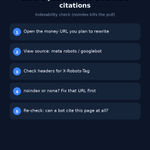
page is indexed but AI Overviews never link it? check your snippet controls before anyone sells you an llms.txt.
Google's AI features doc: to be a supporting link in AI Overviews or AI Mode, a page must be indexed and eligible to show in Search with a snippet. no extra technical requirements, no AI text files, no special schema.
so the snippet part is where pages quietly drop out. the snippet eligibility check, about 10 min per money page:
1. URL Inspection: is the page indexed?
2. in the HTML Googlebot got, look for nosnippet or max-snippet:0. Google's robots doc says nosnippet also stops the page being used as direct input for AI Overviews and AI Mode
3. check response headers too. X-Robots-Tag can carry the same nosnippet
4. find any data-nosnippet. an unclosed div with it hides everything after it, often the actual answer
5. confirm robots.txt and your CDN let Googlebot in
limits: passing this doesn't guarantee a citation, Google says serving isn't guaranteed. and it's Google only, nothing about ChatGPT.
ever found a stray nosnippet on a page that mattered?
if your boss keeps asking what to add for AI Overviews, Rank Season is the free monday SEO newsletter for that. first issue drops soon, and the list gets exclusive access to a link trading community. link in bio
sending a free product to a blogger in exchange for a review with a link?
Google's spam policy lists that exact move as link spam. it sits under buying links, right next to paying cash.
the fix isn't to stop seeding. it's the link attribute:
1. tell them up front the link should be rel="sponsored" (or nofollow)
2. never make a followed link a condition of the deal
3. drop the keyword anchor text asks
4. judge the placement on readers and clicks, not ranking credit
the same policy says paid and sponsored links are fine when they're marked sponsored or nofollow.
do you ask for sponsored on seeding links, or hope nobody checks?
1
2
237
Crawl Stats looks useless until you click one row.
Search Console Help: click into a grouped entry (for example the HTML row) to see example URLs with crawl time, response code, and response size.
the HTML row check, about 5 min:
1. open Settings > Crawl stats
2. click HTML under file type (or a bad response bucket)
3. scan the example URLs for patterns (params, old paths, soft errors)
4. fix the links or status codes on those patterns before you publish more pages
trap: treating missing URLs in the example list as proof Google never crawled them. Help says examples are a sample, not a full log.
when did you last click into an HTML row in Crawl Stats?
3
7
269
before you rewrite titles over a one-day CTR crash in Search Console, check the clock.
Google's Performance troubleshooting doc: in all views except the 24-hour view, daily data is tracked and labeled in Pacific Time. if Analytics or your warehouse uses another zone, the day buckets won't line up.
same page: collected data is usually available in 2-3 days. so today's "drop" may still be incomplete, not a ranking failure.
the Pacific day check, about 10 min:
1. pick the weird day in GSC Performance
2. convert that Pacific day boundary into your reporting timezone (and your client's)
3. compare clicks/impressions on the overlapping window, not the calendar label alone
4. wait until the day is at least 2-3 days old before you call it final
5. only then decide if titles, snippets, or an AI Overview change is the real story
trap: mixing the 24-hour view with the daily chart. Help calls out that exception on purpose.
quick one: which timezone do you paste under GSC screenshots in client decks, Pacific, your local, or you skip it?
if weekly SEO reports keep arguing about which day the drop started, Rank Season is built for that cleanup. free monday newsletter, first issue drops soon, and the list gets exclusive access to a link trading community. link in bio
5
8
243
server melting under Googlebot and someone wants to block the bot in robots.txt for a week?
Google's crawling errors doc: in an emergency, return 503 or 429 temporarily. Googlebot retries those URLs for about 2 days.
past that window, those codes can get the URLs dropped from the index. so stop the 503/429 once load cools, then fix capacity.
the 2-day throttle check:
1. confirm the spike is Googlebot (Crawl Stats Googlebot type / server logs)
2. return 503 or 429 only while the host is overloaded
3. stop those codes within about 2 days
4. then raise capacity or trim junk crawl paths, not a week-long robots block
ever had to throttle Googlebot on purpose?
3
6
233
the Sitemaps report in Search Console can hide most of your submit history.
Google's own help says the report shows a maximum of 1,000 submitted requests. you can submit more, but only 1,000 show, and they're not in submission order. there's no way in Search Console to see the rest.
so "it's not in the list" is not proof Google never got that sitemap.
the sitemaps request audit, about 15 min:
1. open Sitemaps and note how many rows you already have
2. if you're near or over ~1,000 submits, stop treating a missing row as "never submitted"
3. keep your live sitemap URL(s) in a sheet with date last changed + last Success / error you actually saw
4. for anything critical, re-test with URL Inspection live fetch on the sitemap URL, then resubmit only if the fetch fails or the file changed for real
5. don't spam resubmits to "refresh the list". that just burns more of the 1,000 visible slots
trap: reading robots.txt discovery as if it should appear in this report. Help says the table only covers submits via the report or the API.
quick one: roughly how many sitemap submit rows do you have in GSC right now, under 100, a few hundred, or getting near 1,000?
if you've been guessing which sitemap Google still has on file, Rank Season is the monday note for that Search Console cleanup. free, first issue isn't out yet, and the list gets exclusive access to a link trading community. link in bio
1
4
208
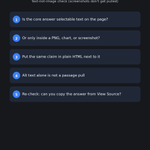
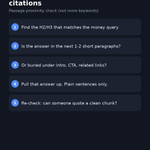
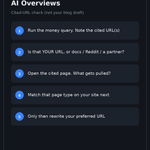
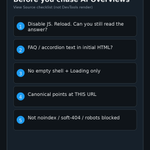
opened Ahrefs Brand Radar for an AI visibility audit and only checked press mentions?
that's the wrong filter. Reddit tracked AI brand mentions harder than news in Ahrefs' new study
5
9
230
Ahrefs (Louise Linehan): Reddit mentions in ranking threads correlated 0.75 with AI brand mentions across ChatGPT, AI Mode, and AI Overviews. highest of 7 mention types
news articles scored 0.67. general webpage mentions scored 0.70. sample was 10,000 brands and 260M non-branded prompts in Brand Radar
1
2
83