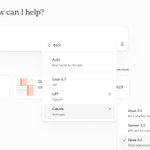
More model choice. More ways to get work done with Microsoft Copilot.
Anthropic's Claude Fable 5.2 is rolling out in Copilot Cowork and Copilot Studio, bringing enhanced reasoning and coding capabilities to complex tasks. Combined with Work IQ, Copilot delivers results grounded in your organization's context so responses reflect your actual work instead of the prompt alone.
Learn more: msft.it/6015x6DLJ
Your first draft isn't going to write itself. That doesn't mean you have to do it alone.
Copilot in Word will take context from your emails, meetings, and chats to create an initial draft you can work with, which means you're already one step closer to your final draft.
Quarterly close. Forecast updates. Recurring workflows.
What could you delegate to Copilot Cowork? Tune back in tomorrow to see how finance teams are putting it to work.
Get to the review faster with the new accounting skills in Microsoft Copilot in Excel. Match transactions, flag exceptions, and trace calculations to their sources, with your judgment guiding the final call.
See how: msft.it/102926x
Watch Brian showcase our new accounting skills in Copilot in Excel, part of 25+ new finance skills and plugins we’re bringing to Microsoft Copilot to help finance professionals spend less time assembling work and more time applying their expertise.
Finance teams help the business understand what's happening and decide what to do next. That takes expertise, and a lot of routine work to get to the insights.
Today we're introducing more than 25 new finance skills and plugins in Microsoft Copilot, across Excel and Cowork, to take on more of that work and give you more time for the insights.
Copilot understands accounting workflows and can work the way you do. Here's a variance analysis in Excel, using the formulas and layout you want.
See what Copilot can do inside Word. Draft faster, write more clearly, and easily summarize long documents using relevant Microsoft 365 context. Meet the Word team for live demos and Q&A on October 22.
To register, follow the link below and click "Register Now." Then search for “Microsoft Copilot in Word: Turn a blank page into a polished draft” and click "Select Session."
aka.ms/WordLivewebinar?ocid=…
Autopilot can take on routine tasks and longer-running processes, helping move work toward completion while people stay focused on the decisions and outcomes that need them most. Hear Microsoft Copilot EVP Jacob Andreou explain how Autopilot changes what teams can delegate to AI.
What does it look like when teams can turn shared knowledge into actionable insights?
See how @PreciselyData, a unified data management company for AI-ready data, is using Copilot Notebooks to create and share sales-play notebooks across priority customer use cases, giving its sales organization a focused place to learn, explore, and chat with Copilot to uncover the insights they need. msft.it/6010avGku
Copilot Notebooks can now delegate simple work to Copilot, create interactive reports, edit Word, Excel, PowerPoint files directly with the full power of Office, and more.
Learn more: msft.it/6018atw8s
Give your legal team a head start. Use Copilot in Word to draft agreements and review contracts against your standards, or Cowork to take on broader, multi-step work across contracts, emails, meetings, and files.
Your trusted sources. Your standards. Your final say. msft.it/6012atyxG
✨ See how OneDrive, the intelligent files solution for Microsoft 365, helps you turn content into outcomes with Copilot. Join us for Copilot + OneDrive—Your file system and photo solution for the AI era on October 20th, for the 4th annual event.
Register at: msft.it/6019asSdU
#Microsoft365 #Copilot #OneDriveEvent
The full power of Office is coming to Copilot. Create, edit, and collaborate with Word, Excel, and PowerPoint in one connected experience, without losing context or switching tools. Now rolling out in Frontier.
Starting today, the full power of Microsoft Office is rolling out to the Copilot App in Frontier. We're bringing together the capabilities that your business runs on every day within Word, Excel and PowerPoint inside of the new OS for work.
This new experience supports your entire workflow, from the first prompt to the finishing touches. You can collaborate with others, use branded templates, and return to earlier iterations through version history as your work evolves. In the same workspace, you can choose from a robust library of frontier models or use the Auto router to match the right model to the task at hand.
Learn more in my blog post: techcommunity.microsoft.com/…
The new Copilot Home brings Chat and Cowork together in one experience, making it easier to move from thinking to doing without losing context along the way. Hear Microsoft Copilot EVP Jacob Andreou explain why Home is the new starting point for work.
Hybrid Intelligence is moving closer to the work already happening on your PC. From file wrangling to carrying out workflows, Copilot on Windows balances cloud and locally run agents to help you stay in the flow of work, securely.
Coming soon. blogs.windows.com/windowsexp…
What if an icon could do more than identify a product, but mirror its purpose?
Explore the thinking behind the evolution of the Copilot icon: msft.it/6010aW3dn
Copilot Code helps more people turn ideas into apps, workflows, and solutions, making it easier to build what they need to get work done. Watch Microsoft Copilot EVP Jacob Andreou share how Copilot Code expands who gets to build.
Learn more: msft.it/6010alSkA
More models, more ways to delegate work to Copilot.
OpenAI's GPT-6.1 Sol and Anthropic's Claude Sonnet 5.5 start rolling out today, joining the Claude Opus 5.5 and GPT-6 Sol options we added earlier this month.
Pick the model that fits the task, and Work IQ helps ground responses in your files, meetings and chats, within your existing permissions.
Rolling out today in Copilot Cowork and Copilot Studio. Word, Excel, PowerPoint and Chat follow in phases over the coming week.
Read more: msft.it/6015alJL1
The new Copilot brings Home, Code, and Autopilot together in one place to help you create custom apps, build a deck, automate workflows, and pick up work where you left off.
Start using the Copilot app now and try out new features when they become available in Frontier: msft.it/6017aYYQH
AI built for work should help teams find answers in company data, develop their ideas, and build agents around their own workflows.
That means thinking beyond whichever model is winning this week and giving businesses AI embedded in the apps they use and the intellectual property that sets them apart from the competition.
Read the full letter from Jared Spataro, Chief Marketing Officer, AI at Work, on how Microsoft is building AI for work.
msft.it/6010acfbg