

“Future Data Analyst | Excel • SQL • Power BI • Python | Sharing my learning journey, projects & insights publicly | Solving problems one dataset at a time”
Anambra
Joined June 2017
- Tweets155
- Following135
- Followers141
- Likes298







I tried to combine 4 Excel files with Power Query. Excel only let me pick 2.
The fix: switch Append to "Three or more tables."
Result: 4 yearly files became 1 table of 51,290 rows.
Small settings, big lessons.
What's your favourite Power Query tip?
#PowerQuery #Excel


1
3
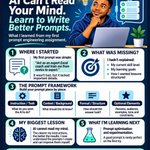
I used to prompt AI "anyhow".
Then I learnt a good prompt needs three things:
Task
Context
Output format
Role, audience, tone and examples make it better.
What's your best prompting tip?
#PromptEngineering

1
2
9
Data analysis isn't magic. It's a process anyone can learn. 📊
1️⃣ Ask the right question
2️⃣ Collect the data
3️⃣ Clean it
4️⃣ Analyze it
5️⃣ Share the insights
Which step is hardest for you? 👇
#DataAnalytics #DataSkills

1
7
Stop asking "Which AI is best?" 🤖
Ask "Which AI is right for this task?"
✍️ Claude, Perplexity
🎨 Midjourney
🎬 Runway
🎙️ ElevenLabs
⚙️ Zapier
Which one do you use most? 👇
#AILiteracy #AITools

1
2
106


Day 9 & 10 of my SkillAhead journey 📊
This week, I learned the basics of DAX, conversion rate, and the 4 types of data analysis: Descriptive, Diagnostic, Predictive & Prescriptive.
The biggest takeaway? Good analysis starts with asking the right question.
Still learning.
#tech

1
12
🎓 Grateful to be selected for a 100% fully funded AI Video Editing Scholarship by TeachersOS × AI Content Academy, in honour of OdumoduBlvck.
Another skill. Another opportunity to grow. 🚀🙏🏽
#TeachersOS #AIContentAcademy #OdumoduBlvck #AIVideoEditing

1
32
📊 July 2023 Dashboard completed!
193 total leads. Funmi had the highest (40), Olumide the lowest (27). Female leads: 104 vs Male: 89. Paid leads topped the sales status with 84, while Lagos led branches with 102.
Next up: conversion analysis — descriptive & comparative. 📈
#tech

1
17
This morning’s progress 📊
Worked on a real estate dataset from Kenix Properties Ltd., following the 7-step data analysis process.
✅ Business & domain analysis
✅ Data preparation/ETL with Power Query
Next: PivotTables → data summarization → visualization
#DataAnalytics #Excel


1
20
Day 7 & 8 at SkillAhead 📊
We worked with a real estate dataset, using business questions to uncover insights. Learnt DAX, PivotTables, PivotCharts and how to choose the right visual for the story.
Big takeaway: Don’t just create charts—use them to answer business questions.

1
34
Thank you so much for this opportunity, I have applied.
@silverpenydr @odumodublv56714
docs.google.com/forms/u/0/d/…
1
17
Another Excel practice session done. 📊
Practiced Ctrl + T, table design, filtering, sorting, and Total Row.
🔹 WU BO LUO — most products in stock
🔹 Top 5% retail prices
🔹 WOOD-066 — smallest stock
Small features, but big lessons. 🚀
#Excel #DataAnalytics #SkillAhead


1
18
Been a little quiet because I've been deep in learning.
Day 5 & 6 at SkillAhead covered Data Cleaning & Preparation: DQD, EDA, ETL with Power Query, and PivotTables. One lesson that stood out: as a data analyst, you work with read access, not write access—communicate data issues

1
19
Day 4 at SkillAhead 📊
Today I learned that data analysis starts with understanding the business behind the data — the client, goals, problem statement, KPIs, dimensions, measures and domain.
We also touched on PivotTables & PivotCharts.
#SkillAhead #DataAnalytics

19
Day 3 at SkillAhead 📊
Learnt Excel’s Aggregate & Text Functions — COUNT, SUM, AVERAGE, CONCAT, LEFT, RIGHT, LEN, MID and more.
One function at a time, one step closer. 🚀
#SkillAhead #Excel #DataAnalytics #BuildInPublic

12
A little sneak peek of what kept me awake last night... 👀
Still building the dashboard, so here's a preview. Every late night, mistake, and breakthrough is part of the journey.
Can't wait to share the finished version!
What project or goal has been keeping you up lately?
#Excel
1
18
Two photos. Two different chapters.
The first reminds me where I started. The second reminds me why consistency matters.
The workspace changed, but the goal stayed the same: keep learning, keep improving.
Small upgrades. Daily effort. Long-term growth.
#DataAnalytics #Tech


17
Day 2 at SkillAhead School 📊
We covered Excel function categories, syntax, and the difference between relative, absolute, and mixed cell references.
It's funny how the "small" concepts make everything else click. Looking forward to putting them into practice.
#SkillAhead #Excel

16
