

Founder, LivingDevOps | AI Platform Engineer | Tech Storyteller DM/email for collab ( livingdevops@gmail.com )
Noida, India
Joined February 2023
- Tweets8.4K
- Following940
- Followers24.9K
- Likes7.7K





Pinned Tweet
After 14 years in production DevOps and training 400+ engineers, I just launched my most advanced bootcamp to date.
28 weeks. 56 live classes. DevOps + MLOps + AIOps.
Built for experienced engineers who want to move into MLOps and AIOps without faking it on their resume.
Check it out 👇
livingdevops.com/courses/28-…
Launch offer: up to 30% off if you book by 15th June.

Akhilesh Mishra retweeted
A lot of people are building agentic workflows for things that could have been a simple automation.
Akhilesh Mishra retweeted
Production Kubernetes cluster is down. Your manager is asking for updates every 5 minutes.
Here’s your step-by-step troubleshooting playbook:
Step 1: Get your bearings
Check where you are: kubectl config current-context
See all contexts: kubectl config get-contexts
Switch if needed: kubectl config use-context name
List namespaces: kubectl get ns
Step 2: See the big picture
Node health: kubectl get nodes
All pods: kubectl get pods -A
Recent events: kubectl get events –sort-by=.metadata.creationTimestamp -A
This tells you if it’s a cluster-wide issue or isolated problem.
Step 3: Focus on the failing pod
Get details: kubectl describe pod podname -n namespace
Check logs: kubectl logs podname -n namespace
Get inside: kubectl exec -it podname -n namespace – /bin/sh
Step 4: Check health probes
Look for probe failures in the describe output
Test probe endpoint: kubectl exec -it podname -n namespace – curl localhost:port/health
Step 5: Check deployments and rollouts
Rollout status: kubectl rollout status deployment/name -n namespace
View history: kubectl rollout history deployment/name -n namespace
Rollback: kubectl rollout undo deployment/name -n namespace
Step 6: Verify networking
List services: kubectl get svc -n namespace
Check endpoints: kubectl get endpoints -n namespace
Test DNS: kubectl exec -it podname – nslookup servicename
Step 7: Quick fixes that work
Restart deployment: kubectl rollout restart deployment/name -n namespace
Delete problematic pod: kubectl delete pod podname -n namespace
The key is following the steps in order, not jumping around randomly.

Production Kubernetes cluster is down. Your manager is asking for updates every 5 minutes.
Here’s your step-by-step troubleshooting playbook:
Step 1: Get your bearings
Check where you are: kubectl config current-context
See all contexts: kubectl config get-contexts
Switch if needed: kubectl config use-context name
List namespaces: kubectl get ns
Step 2: See the big picture
Node health: kubectl get nodes
All pods: kubectl get pods -A
Recent events: kubectl get events –sort-by=.metadata.creationTimestamp -A
This tells you if it’s a cluster-wide issue or isolated problem.
Step 3: Focus on the failing pod
Get details: kubectl describe pod podname -n namespace
Check logs: kubectl logs podname -n namespace
Get inside: kubectl exec -it podname -n namespace – /bin/sh
Step 4: Check health probes
Look for probe failures in the describe output
Test probe endpoint: kubectl exec -it podname -n namespace – curl localhost:port/health
Step 5: Check deployments and rollouts
Rollout status: kubectl rollout status deployment/name -n namespace
View history: kubectl rollout history deployment/name -n namespace
Rollback: kubectl rollout undo deployment/name -n namespace
Step 6: Verify networking
List services: kubectl get svc -n namespace
Check endpoints: kubectl get endpoints -n namespace
Test DNS: kubectl exec -it podname – nslookup servicename
Step 7: Quick fixes that work
Restart deployment: kubectl rollout restart deployment/name -n namespace
Delete problematic pod: kubectl delete pod podname -n namespace
The key is following the steps in order, not jumping around randomly.
Akhilesh Mishra retweeted
Everyone is releasing their own Kubernetes troubleshooting agent, and almost none of them are good enough.
So why not build one open-source agent together and keep improving it?
One unified framework with security, guardrails, and add-ons for each environment built in.
Fewer demos. One agent worth trusting in production.
Everyone is releasing their own Kubernetes troubleshooting agent, and almost none of them are good enough.
So why not build one open-source agent together and keep improving it?
One unified framework with security, guardrails, and add-ons for each environment built in.
Fewer demos. One agent worth trusting in production.
Akhilesh Mishra retweeted
Before you learn Kubernetes, understand why to learn Kubernetes. Or should you?
25 years ago, if you wanted to run an application, you had to buy an expensive physical server. You did the cabling. Installed an OS. Configured everything. Then run your app.
If you needed another app, you had to buy another expensive server ($10k-$50k for enterprise).
Only banks and big companies could afford this. It was expensive and painful.
Then came virtualization. You could take 10 physical servers and split them into 50 or 100 virtual machines. Better, but you still had to buy and maintain all that hardware.
Around 2005, Amazon had a brilliant idea. They had data centers worldwide but weren't using full capacity. So they decided to rent it out.
For startups, this changed everything. Launch without buying a single server. Pay only for what you use. Scale when you grow.
Netflix was one of the first to jump on this.
But this solved only the server problem.
But "How do people build applications?" was still broken.
In the early days, companies built one big application that did everything. Netflix had user accounts, video player, recommendations, and payments all in one codebase.
Simple to build. Easy to deploy. But it didn't scale well.
In 2008, Netflix had a major outage. They realized if they were getting downtime with just US users, how would they scale worldwide?
So they broke their monolith into hundreds of smaller services. User accounts, separate. Video player, separate. Recommendations, separate.
They called it microservices.
Other companies started copying this approach. Even when they didn't really need it.
But microservices created a massive headache. Every service needed different dependencies. Python version 2.7 for one service. Python 3.6 for another. Different libraries. Different configs.
Setting up a new developer's machine took days. Install this database version. That Python version. These specific libraries. Configure environment variables.
And then came the most frustrating phrase in software development: "But it works on my machine."
A developer would test their code locally. Everything worked perfectly.
They'd deploy to staging. Boom. Application crashed. Why? Different OS version. Missing dependency. Wrong configuration.
Teams spent hours debugging environment issues instead of building features.
Then Docker came along in 2012-13.
Google had been using containers for years with its Borg system. But only top Google engineers could use it, too complex for normal developers.
Docker made containers accessible to everyone. Package your app and all dependencies into a single container. The exact Python version. The exact libraries. The exact configuration.
Run it on your laptop. Works. Run it on staging. Works. Run it in production. Still works.
No more "works on my machine" problems. No more spending days setting up environments.
By 2014, millions of developers were running Docker containers.
But running one container was easy.
Running 10,000 containers was a nightmare.
Microservices meant managing 50+ services manually. Services kept crashing with no auto-restart. Scaling was difficult. Services couldn't find each other when IPs changed.
People used custom shell scripts. It was error-prone and painful. Everyone struggled with the same problems. Auto-restart, auto-scaling, service discovery, load balancing.
AWS launched ECS to help. But managing 100+ microservices at scale was still a pain.
This is exactly what Kubernetes solved.
Google saw an opportunity. They were already running millions of containers using Borg. In 2014, they rebuilt it as Kubernetes and open-sourced it.
But here's the smart move. They also launched GKE, a managed service that made running Kubernetes so easy that companies started choosing Google Cloud just for it.
AWS and Azure panicked. They quickly built EKS and AKS. People jumped ship, moving from running k8s clusters on-prem to managed Kubernetes in the cloud.
12 years later, Kubernetes runs 80-85% of production infrastructure. Netflix, Uber, OpenAI, and Medium all run on it.
Then AI happened. And Kubernetes became even more critical.
AI startups need to run thousands of ML training jobs simultaneously. They need GPU scheduling. They need to scale inference workloads based on demand.
Companies like OpenAI, Hugging Face, and Anthropic run their AI infrastructure on Kubernetes.
Training models, running inference APIs, orchestrating AI agents, all on K8S.
The AI boom made Kubernetes essential.
Now, advanced Kubernetes skills pay big bucks.
Kubernetes won because of the perfect timing. It solved the right problems at the right time.
Understanding this story is more important than memorizing kubectl commands.
Now go learn Kubernetes already.
Before you learn Kubernetes, understand why to learn Kubernetes. Or should you?
25 years ago, if you wanted to run an application, you had to buy an expensive physical server. You did the cabling. Installed an OS. Configured everything. Then run your app.
If you needed another app, you had to buy another expensive server ($10k-$50k for enterprise).
Only banks and big companies could afford this. It was expensive and painful.
Then came virtualization. You could take 10 physical servers and split them into 50 or 100 virtual machines. Better, but you still had to buy and maintain all that hardware.
Around 2005, Amazon had a brilliant idea. They had data centers worldwide but weren't using full capacity. So they decided to rent it out.
For startups, this changed everything. Launch without buying a single server. Pay only for what you use. Scale when you grow.
Netflix was one of the first to jump on this.
But this solved only the server problem.
But "How do people build applications?" was still broken.
In the early days, companies built one big application that did everything. Netflix had user accounts, video player, recommendations, and payments all in one codebase.
Simple to build. Easy to deploy. But it didn't scale well.
In 2008, Netflix had a major outage. They realized if they were getting downtime with just US users, how would they scale worldwide?
So they broke their monolith into hundreds of smaller services. User accounts, separate. Video player, separate. Recommendations, separate.
They called it microservices.
Other companies started copying this approach. Even when they didn't really need it.
But microservices created a massive headache. Every service needed different dependencies. Python version 2.7 for one service. Python 3.6 for another. Different libraries. Different configs.
Setting up a new developer's machine took days. Install this database version. That Python version. These specific libraries. Configure environment variables.
And then came the most frustrating phrase in software development: "But it works on my machine."
A developer would test their code locally. Everything worked perfectly.
They'd deploy to staging. Boom. Application crashed. Why? Different OS version. Missing dependency. Wrong configuration.
Teams spent hours debugging environment issues instead of building features.
Then Docker came along in 2012-13.
Google had been using containers for years with its Borg system. But only top Google engineers could use it, too complex for normal developers.
Docker made containers accessible to everyone. Package your app and all dependencies into a single container. The exact Python version. The exact libraries. The exact configuration.
Run it on your laptop. Works. Run it on staging. Works. Run it in production. Still works.
No more "works on my machine" problems. No more spending days setting up environments.
By 2014, millions of developers were running Docker containers.
But running one container was easy.
Running 10,000 containers was a nightmare.
Microservices meant managing 50+ services manually. Services kept crashing with no auto-restart. Scaling was difficult. Services couldn't find each other when IPs changed.
People used custom shell scripts. It was error-prone and painful. Everyone struggled with the same problems. Auto-restart, auto-scaling, service discovery, load balancing.
AWS launched ECS to help. But managing 100+ microservices at scale was still a pain.
This is exactly what Kubernetes solved.
Google saw an opportunity. They were already running millions of containers using Borg. In 2014, they rebuilt it as Kubernetes and open-sourced it.
But here's the smart move. They also launched GKE, a managed service that made running Kubernetes so easy that companies started choosing Google Cloud just for it.
AWS and Azure panicked. They quickly built EKS and AKS. People jumped ship, moving from running k8s clusters on-prem to managed Kubernetes in the cloud.
12 years later, Kubernetes runs 80-85% of production infrastructure. Netflix, Uber, OpenAI, and Medium all run on it.
Then AI happened. And Kubernetes became even more critical.
AI startups need to run thousands of ML training jobs simultaneously. They need GPU scheduling. They need to scale inference workloads based on demand.
Companies like OpenAI, Hugging Face, and Anthropic run their AI infrastructure on Kubernetes.
Training models, running inference APIs, orchestrating AI agents, all on K8S.
The AI boom made Kubernetes essential.
Now, advanced Kubernetes skills pay big bucks.
Kubernetes won because of the perfect timing. It solved the right problems at the right time.
Understanding this story is more important than memorizing kubectl commands.
Now go learn Kubernetes already.

Akhilesh Mishra retweeted
Top 25 AWS services explained with a punch
Bookmark this.
>> COMPUTE
EC2 - Your server, but in the cloud. You pay even when it's doing nothing. (Sound familiar?)
Lambda - EC2's lazy cousin. Only wakes up when there's work. No work, no bill.
ECS - "I want containers, but Kubernetes gives me anxiety."
EKS - Kubernetes. For people who enjoy suffering professionally.
Auto Scaling - Your app goes viral overnight. This keeps it from dying of attention.
>>STORAGE
S3 - A bucket that never fills up. Jeff Bezos's gift to humanity.
EBS - A hard drive for your EC2. Loyal, but only to one instance at a time.
EFS - EBS for people who like sharing. Many instances, one file system.
FSx - EFS for enterprises that need Windows compatibility and a bigger invoice.
Snowball - Internet too slow to upload your data? AWS ships you an actual box.
>> NETWORKING
VPC - Your private neighborhood inside AWS. Strangers not allowed.
Route 53 - The GPS of your app. Tells traffic where to go.
ELB - The club bouncer that splits the crowd so no single server gets crushed.
CloudFront - Your content, cached around the globe. Nobody likes a slow website.
Direct Connect - A private highway between your office and AWS. No public internet drama.
>> DATABASES
RDS - A managed database. AWS handles the backups so you can sleep at night.
DynamoDB - NoSQL at insane speed. Schema? We only care about the keys here.
Aurora - RDS on steroids. Faster, smarter, slightly more expensive.
Redshift - A warehouse for your data, not your clothes. Petabytes of analytics.
ElastiCache - RAM for your app. Hitting the database every single time is embarrassing.
>> SECURITY
IAM - Decides who gets in and what they can touch. Get this wrong and you're the headline.
KMS - Locks your secrets in a vault. You decide who gets the key.
Cognito - "Login with Google," but you built it on AWS.
GuardDuty - The security camera that never blinks. Watches for sketchy behavior 24/7.
WAF - Stops the bad traffic at the door before it touches your app.
Akhilesh Mishra retweeted
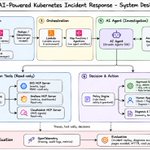
In an interview, I was asked to design an AI agent for Kubernetes incident response.
I started with three goals:
- Reduce noise. Filter known non-actionable alerts before they wake someone up.
- Reduce MTTR. The agent does the repeat work (events, logs, metrics, runbooks) and hands over a diagnosis.
- Auto-resolve simple, low-risk issues. Everything else needs human approval.
>> Step 1: The alert
Prometheus Alertmanager fires the alert. Email and PagerDuty stay as they are. The agent is an addition, not a replacement.
>> Step 2: Getting the alert to the agent
SNS sends the alert to SQS for buffering, retries and a dead letter queue. I add deduplication so one incident does not start 50 runs, and idempotency because SQS can deliver twice.
>> Step 3: Triggering the agent
A Lambda checks the alert comes from an approved source and environment. If not, it stops. Because of Lambda time limits, it stays a thin trigger and the agent workflow runs on AgentCore.
>> Step 4: Giving the agent tools
Three read-only MCP servers: EKS, Grafana, CloudWatch. Every call goes through a gateway with OIDC auth. The agent never holds cluster credentials.
>> Step 5: Investigation
The agent reads the environment, cluster and service from the alert. Then it:
- Pulls events and log tails from EKS, including previous container logs for crash loops.
- Checks Grafana metrics 10 minutes before and after the alert.
- Checks CloudWatch only if it needs more signals.
>> Step 6: Knowledge base
A Bedrock knowledge base holds troubleshooting playbooks and a rulebook mapping events to recommendations. No matching playbook? The agent says so instead of guessing.
>> Step 7: Deciding the action
- Known noise is suppressed by rules.
- Alerts needing a human go to Slack and PagerDuty with the diagnosis.
- A small list of known-safe actions runs automatically.
- Everything else waits for approval.
>> Step 8: Guardrails
- No deleting deployments, StatefulSets or secrets.
- Pod deletion only when healthy replicas exist.
- Approved environments and triggers only.
- Logs are untrusted input. They are data, never instructions.
>> Step 9: Cost and execution limits
- A small model triages first. Only unclear incidents reach a larger model.
- Token budget per run, plus hourly and daily limits.
- Trimmed tool output: error lines, metric summaries, top 3 knowledge base results.
- Max 3 retries per tool call, never on permission errors.
- 10 seconds per tool call, 5 minutes per investigation, max 10 tool calls.
The SQS visibility timeout must exceed the run limit, or a second agent starts mid-investigation. When any limit hits, the agent stops, shares what it found as incomplete, and notifies a human.
>> Step 10: Proving it works
I replay past incidents and compare the diagnosis with the human root cause. I track accuracy, pages avoided, time to diagnosis and cost per investigation. If accuracy is low, the agent stays advisory.
Building the agent is the easy part.
Deciding what it must never do is the real engineering challenge.

Akhilesh Mishra retweeted
Don't call yourself an SRE if you can't protect your systems from cascading failures.
For example, you have an e-commerce app with Order, Inventory, Payment, and Notification services sitting behind an API Gateway.
Imagine your inventory service, which usually responds in 100 ms, suddenly takes 10 seconds to reply.
How can you prevent the other services from experiencing a cascading failure?
>> Cascading failure occurs when an unhealthy service affects dependent services, triggering a chain reaction across the system.
> Order Service keeps waiting on Inventory.
> Threads and connections stay occupied.
> New requests pile up behind them.
> API Gateway starts timing out.
> Payment and Notification also fail, even though they are perfectly healthy.
Here are the 5 safety gates I would implement in this exact order.
>> 1. Timeouts
- Never wait forever on a downstream call.
- A 2-second timeout on Inventory releases threads and keeps the service alive.
- Set one at every network boundary.
- The downstream timeout must fit inside the upstream deadline.
>> 2. Retries with budgets
- Retries help with temporary failures, but they can finish off a struggling service.
- 1,000 failed requests with 3 retries each cause Inventory to see 4,000 requests.
- Use exponential backoff and jitter so clients don't retry in sync.
- Cap the attempts and set a retry budget, so retries stay a small share of total traffic.
- Retry only safe operations. Payments need idempotency keys.
>> 3. Circuit breaker
- If Inventory keeps failing, stop calling it.
- CLOSED means normal. OPEN rejects instantly. HALF-OPEN lets a few test requests through after cooldown.
- Fail fast or return a safe fallback, like "stock status unavailable, try again".
- It saves your resources and gives Inventory room to recover.
>> 4. Bulkheads
- If Inventory, Payment, and Notification share a thread pool, a slow Inventory consumes it all.
- Give each dependency its own pool or concurrency limit.
- Inventory can now exhaust only its own slots. Payment keeps working.
>> 5. Load shedding
- Even with all of the above, you can still get more traffic than you can handle.
- Reject excess traffic deliberately instead of letting everything collapse.
- Rate limit, cap in-flight requests, and limit queue sizes.
- Protect critical paths like checkout. Drop the low-priority stuff first.
- Return 429 for clients sending too much and 503 when overloaded.
>> I will keep an eye on the metrics below too.
- p95 and p99 latency, not averages.
- 5xx and timeout rates.
- Retry rate. A spike means something is already wrong.
- Circuit breaker state changes.
- Connection pool saturation and queue depth.
These five methods are not separate tricks.
They work together as layers of defense at different points in the same request.
Top 25 AWS services explained with a punch
Bookmark this.
>> COMPUTE
EC2 - Your server, but in the cloud. You pay even when it's doing nothing. (Sound familiar?)
Lambda - EC2's lazy cousin. Only wakes up when there's work. No work, no bill.
ECS - "I want containers, but Kubernetes gives me anxiety."
EKS - Kubernetes. For people who enjoy suffering professionally.
Auto Scaling - Your app goes viral overnight. This keeps it from dying of attention.
>>STORAGE
S3 - A bucket that never fills up. Jeff Bezos's gift to humanity.
EBS - A hard drive for your EC2. Loyal, but only to one instance at a time.
EFS - EBS for people who like sharing. Many instances, one file system.
FSx - EFS for enterprises that need Windows compatibility and a bigger invoice.
Snowball - Internet too slow to upload your data? AWS ships you an actual box.
>> NETWORKING
VPC - Your private neighborhood inside AWS. Strangers not allowed.
Route 53 - The GPS of your app. Tells traffic where to go.
ELB - The club bouncer that splits the crowd so no single server gets crushed.
CloudFront - Your content, cached around the globe. Nobody likes a slow website.
Direct Connect - A private highway between your office and AWS. No public internet drama.
>> DATABASES
RDS - A managed database. AWS handles the backups so you can sleep at night.
DynamoDB - NoSQL at insane speed. Schema? We only care about the keys here.
Aurora - RDS on steroids. Faster, smarter, slightly more expensive.
Redshift - A warehouse for your data, not your clothes. Petabytes of analytics.
ElastiCache - RAM for your app. Hitting the database every single time is embarrassing.
>> SECURITY
IAM - Decides who gets in and what they can touch. Get this wrong and you're the headline.
KMS - Locks your secrets in a vault. You decide who gets the key.
Cognito - "Login with Google," but you built it on AWS.
GuardDuty - The security camera that never blinks. Watches for sketchy behavior 24/7.
WAF - Stops the bad traffic at the door before it touches your app.
In an interview, I was asked to design an AI agent for Kubernetes incident response.
I started with three goals:
- Reduce noise. Filter known non-actionable alerts before they wake someone up.
- Reduce MTTR. The agent does the repeat work (events, logs, metrics, runbooks) and hands over a diagnosis.
- Auto-resolve simple, low-risk issues. Everything else needs human approval.
>> Step 1: The alert
Prometheus Alertmanager fires the alert. Email and PagerDuty stay as they are. The agent is an addition, not a replacement.
>> Step 2: Getting the alert to the agent
SNS sends the alert to SQS for buffering, retries and a dead letter queue. I add deduplication so one incident does not start 50 runs, and idempotency because SQS can deliver twice.
>> Step 3: Triggering the agent
A Lambda checks the alert comes from an approved source and environment. If not, it stops. Because of Lambda time limits, it stays a thin trigger and the agent workflow runs on AgentCore.
>> Step 4: Giving the agent tools
Three read-only MCP servers: EKS, Grafana, CloudWatch. Every call goes through a gateway with OIDC auth. The agent never holds cluster credentials.
>> Step 5: Investigation
The agent reads the environment, cluster and service from the alert. Then it:
- Pulls events and log tails from EKS, including previous container logs for crash loops.
- Checks Grafana metrics 10 minutes before and after the alert.
- Checks CloudWatch only if it needs more signals.
>> Step 6: Knowledge base
A Bedrock knowledge base holds troubleshooting playbooks and a rulebook mapping events to recommendations. No matching playbook? The agent says so instead of guessing.
>> Step 7: Deciding the action
- Known noise is suppressed by rules.
- Alerts needing a human go to Slack and PagerDuty with the diagnosis.
- A small list of known-safe actions runs automatically.
- Everything else waits for approval.
>> Step 8: Guardrails
- No deleting deployments, StatefulSets or secrets.
- Pod deletion only when healthy replicas exist.
- Approved environments and triggers only.
- Logs are untrusted input. They are data, never instructions.
>> Step 9: Cost and execution limits
- A small model triages first. Only unclear incidents reach a larger model.
- Token budget per run, plus hourly and daily limits.
- Trimmed tool output: error lines, metric summaries, top 3 knowledge base results.
- Max 3 retries per tool call, never on permission errors.
- 10 seconds per tool call, 5 minutes per investigation, max 10 tool calls.
The SQS visibility timeout must exceed the run limit, or a second agent starts mid-investigation. When any limit hits, the agent stops, shares what it found as incomplete, and notifies a human.
>> Step 10: Proving it works
I replay past incidents and compare the diagnosis with the human root cause. I track accuracy, pages avoided, time to diagnosis and cost per investigation. If accuracy is low, the agent stays advisory.
Building the agent is the easy part.
Deciding what it must never do is the real engineering challenge.
Don't call yourself an SRE if you can't protect your systems from cascading failures.
For example, you have an e-commerce app with Order, Inventory, Payment, and Notification services sitting behind an API Gateway.
Imagine your inventory service, which usually responds in 100 ms, suddenly takes 10 seconds to reply.
How can you prevent the other services from experiencing a cascading failure?
>> Cascading failure occurs when an unhealthy service affects dependent services, triggering a chain reaction across the system.
> Order Service keeps waiting on Inventory.
> Threads and connections stay occupied.
> New requests pile up behind them.
> API Gateway starts timing out.
> Payment and Notification also fail, even though they are perfectly healthy.
Here are the 5 safety gates I would implement in this exact order.
>> 1. Timeouts
- Never wait forever on a downstream call.
- A 2-second timeout on Inventory releases threads and keeps the service alive.
- Set one at every network boundary.
- The downstream timeout must fit inside the upstream deadline.
>> 2. Retries with budgets
- Retries help with temporary failures, but they can finish off a struggling service.
- 1,000 failed requests with 3 retries each cause Inventory to see 4,000 requests.
- Use exponential backoff and jitter so clients don't retry in sync.
- Cap the attempts and set a retry budget, so retries stay a small share of total traffic.
- Retry only safe operations. Payments need idempotency keys.
>> 3. Circuit breaker
- If Inventory keeps failing, stop calling it.
- CLOSED means normal. OPEN rejects instantly. HALF-OPEN lets a few test requests through after cooldown.
- Fail fast or return a safe fallback, like "stock status unavailable, try again".
- It saves your resources and gives Inventory room to recover.
>> 4. Bulkheads
- If Inventory, Payment, and Notification share a thread pool, a slow Inventory consumes it all.
- Give each dependency its own pool or concurrency limit.
- Inventory can now exhaust only its own slots. Payment keeps working.
>> 5. Load shedding
- Even with all of the above, you can still get more traffic than you can handle.
- Reject excess traffic deliberately instead of letting everything collapse.
- Rate limit, cap in-flight requests, and limit queue sizes.
- Protect critical paths like checkout. Drop the low-priority stuff first.
- Return 429 for clients sending too much and 503 when overloaded.
>> I will keep an eye on the metrics below too.
- p95 and p99 latency, not averages.
- 5xx and timeout rates.
- Retry rate. A spike means something is already wrong.
- Circuit breaker state changes.
- Connection pool saturation and queue depth.
These five methods are not separate tricks.
They work together as layers of defense at different points in the same request.
Akhilesh Mishra retweeted
Enjoy Diwali with family without worrying about on calls, weekend patching or whatever you have been prioritising over your family.
Your Job is just the job, not your entire life.
Family is forever, not your employer.
Enjoy Diwali with family without worrying about on calls, weekend patching or whatever you have been prioritising over your family.
Your Job is just the job, not your entire life.
Family is forever, not your employer.
Akhilesh Mishra retweeted
System design 10 years ago: one server, one monolith, one SQL database, one load balancer. "That's all I need."
System design today: API gateway, CDN, Kubernetes, service mesh, Kafka, Redis, Cassandra, Prometheus, and 20 more tools before we write a single line of business logic.
Ten years ago, scaling meant buying a bigger server.
Today, scaling means choosing from dozens of tools, each solving a real problem, but each also adding a new thing to learn, run, and debug at 3 AM.
None of these tools are wrong.
- Kafka is great for event streaming
- Kubernetes is great for orchestration
- Redis is great for caching
The mistake is adding them before the problem exists.
Most systems don't fail because they lacked a service mesh. They fail because nobody understood the system well enough to fix it when it broke.
The best engineers I've worked with in 13 years don't ask "which tools should we use?"
They ask "what is the simplest thing that survives our actual load?"
Then they add complexity only when the numbers force them to.
Every tool you add is a new failure mode you now own.
Good system design isn't about using more tools, it's about earning each one.
